
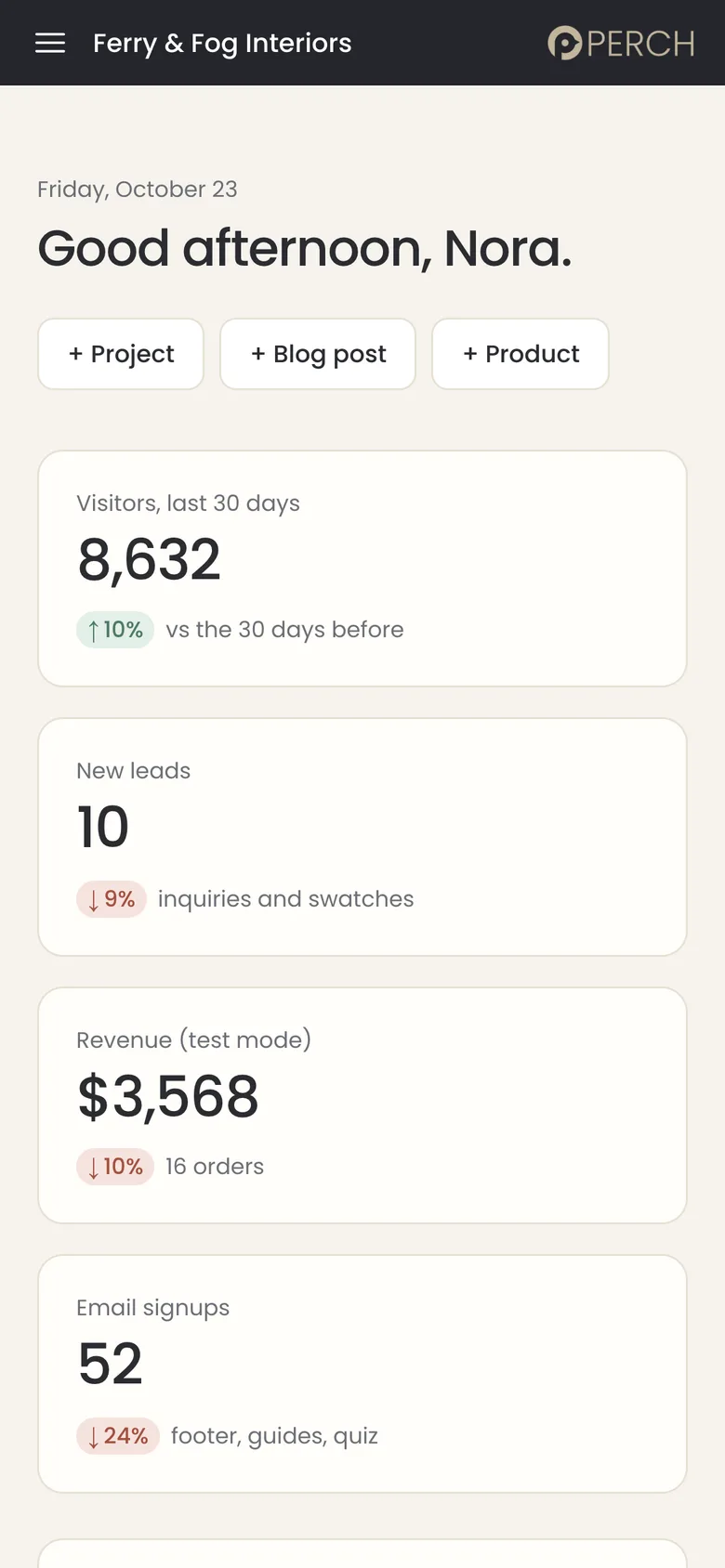
No code.
Change words, photos and pages in a plain editor. If you can edit a document, you can edit your website.
No plugins.
Nothing to install, nothing to update, and no marketplace of add-ons to keep track of.
No waiting.
Changes go live when you press save. There is no developer in the loop and no ticket to open.

Everything you need to run your site yourself.
Pick a task. Every screen is the real PerchPanel dashboard, running the Ferry & Fog Interiors demo.
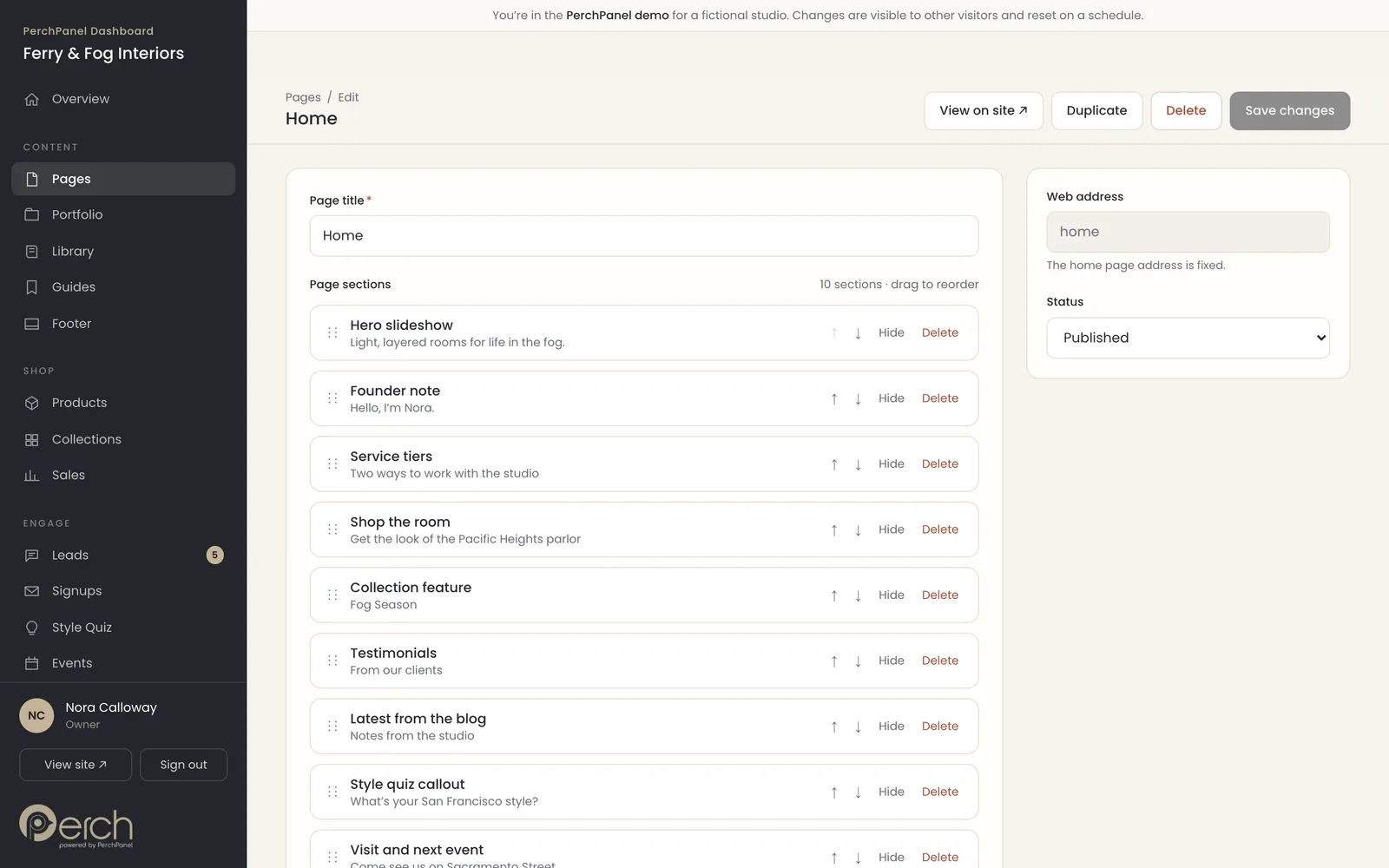
Edit any page by moving sections around.
Drag sections to reorder them, hide one for a season, or add a new one. Change the words and photos, check the search preview and press save.
Your design stays intact. The editor only changes what you are meant to change.
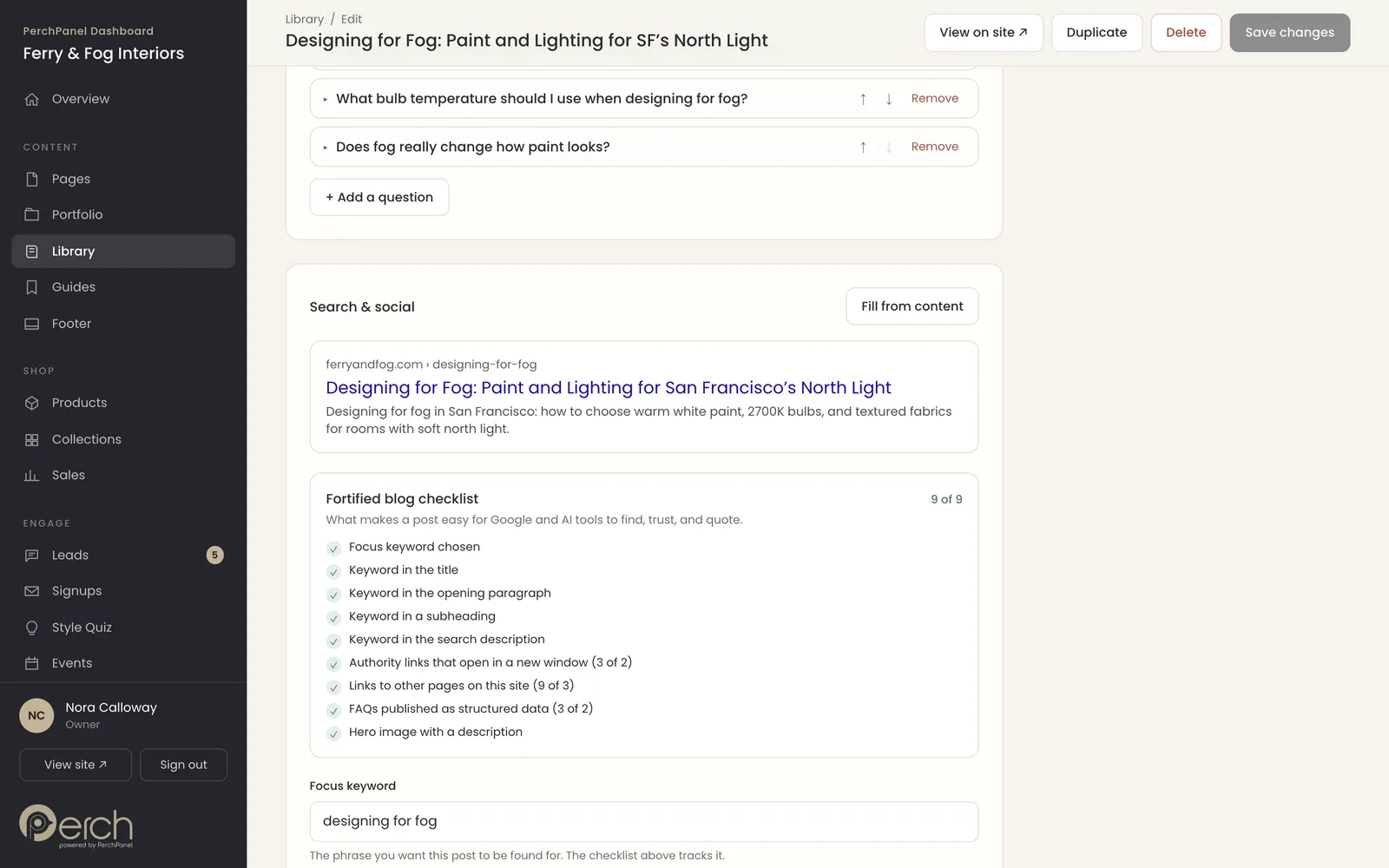
Publish blog posts that get found.
A live checklist shows when a post has a focus keyword, authority links, links to your own pages, FAQs and a hero image: the things that help Google and AI assistants find, trust and quote it.
Want us to write them? PerchPanel Growth includes two fortified posts a month. See how we think about search in AI-Ready Websites.
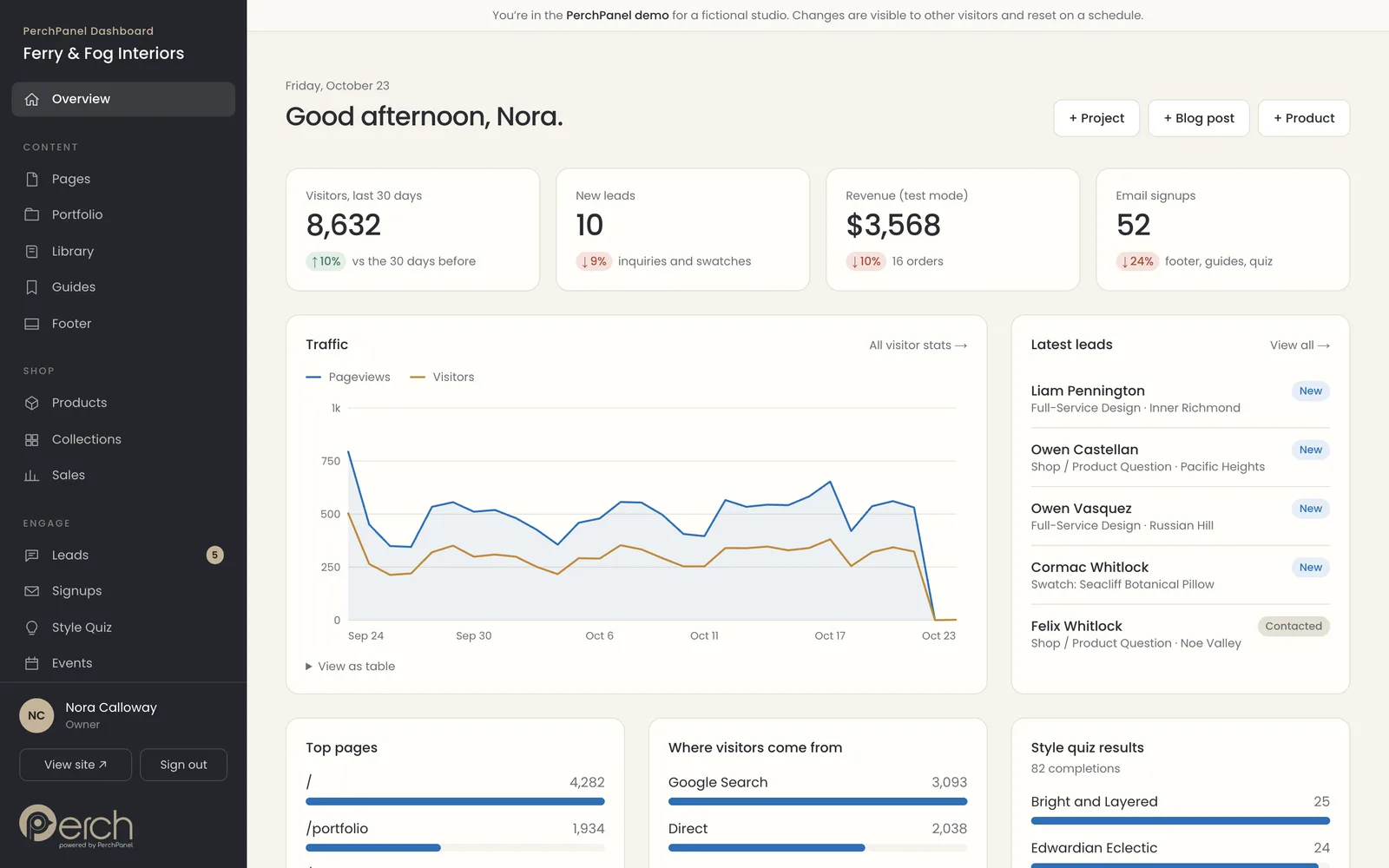
See who visits and who is asking.
Traffic, new leads, revenue and signups sit on one screen. Visitor stats use no cookies and no third-party scripts, so there is nothing extra to install or maintain.
Curious how your site shows up in AI answers? Take the AI Visibility Score.
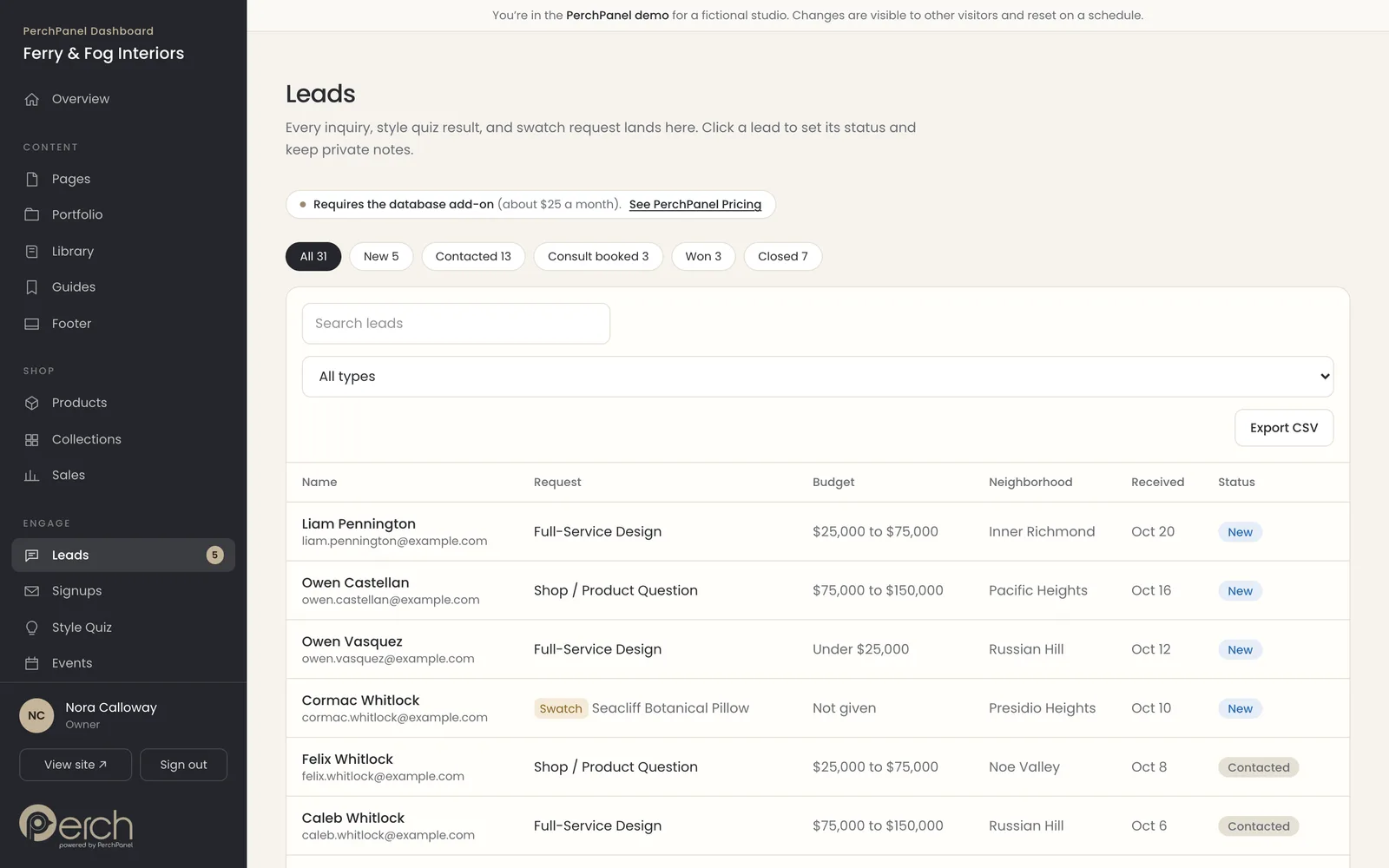
Turn inquiries into clients.
Every form submission lands in one inbox with a status, notes and the details a visitor gave you. Export to a spreadsheet whenever you like.
The same dashboard handles products, orders and free or paid downloads when you are ready to sell.
Edit your whole site
- Page builder with drag-to-reorder sections
- Blog, lookbooks and guides with a rich text editor
- Portfolio with filters
- Footer, team, press, testimonials and events
Sell
- Products and collections
- Cart and checkout
- Orders and weekly sales reports
- Free and paid guides
Grow
- Search preview and SEO fields on every page
- Structured data, sitemap and AI-readable site map
- Quizzes that capture emails
- Event RSVPs
Manage
- Inbox for inquiries, with status and notes
- Signups, downloads and CSV export
- Users and roles: owner, editor, viewer
- Turn sections of your site on and off
Watch
From blank page to published in 90 seconds.
Watch an owner change a headline, reorder a page and check a blog post, with no code and no developer.
Captions are on screen, so it works with the sound off. Try the live demo at PerchPanel.com.
Read the captions+
- 0:02Your website looks great. Now try changing one line.
- 0:08A tiny edit becomes an email, a wait and sometimes an invoice.
- 0:17Built with Claude? Built on WordPress? Same problem.
- 0:27This is PerchPanel. One click and you are in.
- 0:38Open a page. Click a section. Change the words. Press save.
- 0:52Live on your site. No developer. No deploy.
- 0:58Reorder sections, hide one for a season, or add a new one.
- 1:09A live checklist shows when a post is ready for Google and AI search.
- 1:21See who visits and who is asking, on one screen.
- 1:25Edit your website without a developer. PerchPanel starts at $150 a month. Try the live demo at PerchPanel.com.
What is PerchPanel?
PerchPanel is the editing dashboard that comes with every website Birdsall.ai builds on Next.js and Vercel. You use it to change pages, publish blog posts, add products, update photos and manage search settings yourself, in plain language, without touching code.
It is a simple alternative to WordPress for businesses that want to run their own site without maintaining one. There are no plugins to update, no themes to patch and no developer to wait for.
Technically, PerchPanel is a lightweight content management system (CMS). You will never need that word to use it. If you can edit a document, you can edit your website.
Most websites are easy to look at and hard to change.
A site launches and looks great. Then real life arrives. Sound familiar?
You need to change your hours.
A two-minute edit turns into an email, a wait and sometimes an invoice, because the words live in code that only a developer can touch.
Your AI-built site has no editor.
AI tools can generate a site in minutes. Keeping it up to date is the hard part. WeWeb, a no-code platform, describes the usual outcome: non-coders build quickly, then need a developer to maintain it.
WordPress wants constant attention.
Patchstack counted 11,334 new vulnerabilities in the WordPress ecosystem in 2025, and 91% of them were in plugins. Every plugin is one more thing to update.
You are locked out of your own site.
Some sites are set up so only the person who built them can change anything. You paid for the website and still have to ask permission to edit it.
We built PerchPanel so the people who own a website can run it. It sits behind the design we create in Digital Design + UX, and it comes standard with every AI-native website we deliver.
Built with Claude, Lovable or another AI tool?
How to edit a website built with AI, without prompting your way through every change.
A site made by an AI coding tool usually keeps its words and images inside the code, often in JSON or Markdown files. To change a headline, someone has to open a file, edit it and publish the site again. For a non-developer, that means asking the AI to do it and hoping nothing else breaks.
You have three real options.
Option 1
Keep prompting
Fast to start. But every change can touch something you did not ask about, and there is no safe way to preview it.
Option 2
Hire a developer for each edit
Reliable, but slow. Small changes wait in a queue, and the cost of simple updates adds up.
Option 3
Add an editing layer
Your content moves into a database with an editor on top. You change it, press save, and the site updates. Nobody touches code.
PerchPanel is that editing layer, built into the site from day one, so your content is never stuck in a file. Already have an AI-built site? Send it to us and we will tell you whether to keep it, rebuild it or move the content. Our Human + AI work covers how we use tools like Claude responsibly, with people in charge of the result.
An easier alternative
Built for the people who write the content, not the people who wire it up.
WordPress and headless CMS platforms are powerful. They are also built with developers in mind. PerchPanel is built for the owner.
| PerchPanel | WordPress | Headless CMS platform | |
|---|---|---|---|
| Who it is for | Businesses with a website we build for them | Anyone, from solo bloggers to large publishers | Developer-led teams that publish to many channels |
| Setup | Done for you. We design, build and connect it | Install a theme and plugins, or hire a builder | A developer models the content and builds the site that reads it |
| Editing | A plain-language dashboard built around your content | A block editor, plus whatever themes and plugins you add | Editing screens follow the content model a developer sets up |
| Plugins to maintain | None | Often many, each updated separately | Integrations and extensions, set up by a developer |
| Security surface | No third-party plugin marketplace | Plugins account for most reported vulnerabilities (91% in 2025, per Patchstack) | Varies by platform and by how the site is built |
| Monthly cost | $150 plus about $45 in services you own | Hosting, themes, plugins and maintenance, all variable | A platform plan, plus hosting and developer time |
| Works on an existing site | No. Only sites we build natively | Yes | Only with a front end built to read from it |
Where the others still win. If your site depends on a specific WordPress plugin, has many editors or already works well, staying on WordPress can be the right call. We can keep WordPress as the editor behind a faster front end, or move the content entirely. Our guide to moving from WordPress to Vercel explains when each path makes sense. A headless CMS platform is the right tool when the same content has to feed an app, a kiosk and several sites at once. PerchPanel is built for the more common case: one website that you want to run yourself.
Clear pricing, nothing hidden.
Two monthly plans and a one-time setup. Prices as of October 2026.
$150 / month
Billed automatically each month
For businesses that want to edit their own website.
Get startedCancel with 30 days’ notice.
Basic includes:
- The full PerchPanel dashboard for your website
- Pages, blog, products, forms and leads
- Visitor stats with no cookies
- Search settings and structured data on every page
- Users and roles for your team
$750 / month
Billed automatically each month
For businesses that want the content and the upkeep handled for them.
Get startedCancel with 30 days’ notice.
Everything in Basic, and:
- 2 fortified blog posts every month, written for Google and AI answers
- Social media posts sent to you, ready to publish
- Up to 4 hours of maintenance a month: updates, troubleshooting and consultation
- Unused hours do not carry over
$500 / one time
$750 if you sell products online
Paid once, whichever plan you choose.
Start a projectThe website itself is quoted separately.
Setup includes:
- Connecting your database, hosting, email and payment accounts
- Connecting your domain name
- Testing your forms, emails and checkout before you go live
- A simple one-login guide, so every account stays yours
Need more help than your plan includes? Time is $50 an hour with a monthly plan and $150 an hour without one. Send requests by email, and we bill in 15-minute increments. New pages, features and redesigns are quoted separately.
Services we set up and you pay directly
These are separate companies with their own bills, on accounts you own. We help you create one Google account for the business, sign up for each service with it, and connect everything.
| Service | What it does | Typical cost |
|---|---|---|
| Database (Supabase) | Stores everything you edit and everything visitors send you | $25 a month |
| Hosting (Vercel) | Runs your website so it loads fast and stays online | $20 a month |
| Email sending (Resend) | Automatic replies, free guides and newsletters. Only if you want them | $0 to $20 a month |
| Card payments (Stripe) | Lets customers pay by card. Only if you sell online | No monthly fee. About 2.9% plus 30¢ per sale |
What it adds up to. A typical site on PerchPanel Basic costs about $195 a month including services. On PerchPanel Growth it is about $795. If you cancel, your database and hosting stay on your own accounts, which is about $45 a month. The website itself is a separate, defined-scope project we quote after a discovery call.
Already on WordPress, Shopify or another system? This pricing does not apply. PerchPanel only works with sites we build natively. We can move you over if it makes sense.
Service prices are estimates from each company’s published pricing in October 2026. The companies set their own prices and can change them.

Try it yourself
Open the live demo. No signup.
The demo is a real PerchPanel install for a fictional San Francisco design studio. Change a page, add a product, turn a section off, then visit the site and watch it update. Everything resets every night, so you cannot break anything.
Owner
Everything: content, settings, users and the demo reset.
Editor
Edit content and manage leads. No access to settings or users.
Viewer
Read-only. What a client’s accountant would see.
Who PerchPanel fits.
PerchPanel is a good fit when your website changes often and you would rather make those changes yourself. That includes a new project in a portfolio, a seasonal collection, an event, a team announcement or a weekly blog post.
We build for design studios and interior designers, furniture and interiors brands, specialty retail, restaurants, salons, law firms, architecture and engineering firms and real estate teams, among others. Browse every industry we serve.
PerchPanel is not a fit for a site you already have on another platform. It is part of how we build new sites, which is why it only works with sites we build natively. See the portfolio for the kind of work it sits behind, including Ferry & Fog Interiors and the commerce and content platform we built for FlipBird Studios.
AI-Native Websites
What changes when strategy, design, content, search and engineering work as one system.
WordPress to Vercel
When a move makes sense, and how to protect your content and rankings.
AI-Ready Websites
How to structure your site for Google, answer engines and AI discovery.
Build a Website for Google, AI Search and People
Why one website now has to serve three audiences at once.
A website you can finally edit yourself.
Tell us about your site, or the one you are tired of paying someone to change. We will recommend a simple way forward and a clear price.
FAQ
Common questions.
What is PerchPanel?+
PerchPanel is the editing dashboard that comes with every website Birdsall.ai builds on Next.js and Vercel. You use it to change pages, publish blog posts, add products, update photos and manage SEO settings yourself, without code, plugins or a developer.
Is PerchPanel a CMS?+
Yes. PerchPanel is a lightweight content management system built for the sites Birdsall.ai designs. It is not a general-purpose platform with a plugin marketplace. It edits what your website contains: pages, blog posts, products, photos, events, team, testimonials and SEO settings.
Is PerchPanel a headless CMS?+
It works on the same idea: your content lives in a database, separate from the design, so you can change it without touching code. The difference is that PerchPanel arrives already connected to the website we build for you. There is no content model to design and nothing to wire up, which is why owners can use it on day one. If you need one content source feeding several apps and sites, a standalone headless CMS platform is the better fit.
Is PerchPanel an alternative to WordPress?+
For new sites we build, yes. You get a simple dashboard instead of a plugin ecosystem to maintain. PerchPanel does not run on an existing WordPress or Shopify site. If you are on one of those today, our WordPress to Vercel guide covers your options.
How do I edit a website built with Claude or another AI tool?+
Content in AI-built sites usually lives in code files, so every change means asking the AI or a developer. The reliable fix is an editing layer that stores content separately from the code. PerchPanel is that layer. If you already have an AI-built site, send it to us and we will tell you whether to keep it, rebuild it or move the content.
What if someone else built my site, or I built it with Claude?+
PerchPanel is part of the website itself, not a plug-in, so it cannot be added to an existing site. What we can do is rebuild your site on PerchPanel. We carry over the design and content you want to keep, and it is quoted as a project. Tell us what you have and we will recommend whether to rebuild it, move the content or leave it as it is.
Can designers use PerchPanel for their own clients?+
Not at this time. PerchPanel is available only with websites Birdsall.ai builds.
Do I need to know how to code to use PerchPanel?+
No. If you can edit a document, you can edit your website. Roles let you give teammates full editing access or read-only access.
How much does PerchPanel cost?+
PerchPanel Basic is $150 a month, billed automatically. PerchPanel Growth is $750 a month and adds two fortified blog posts, social posts and up to 4 hours of maintenance. There is a one-time setup fee of $500, or $750 if you sell products online. Prices as of October 2026. See the full breakdown.
What other costs are there?+
You pay a few services directly, on accounts you own: a database (about $25 a month), hosting on Vercel (about $20 a month), email sending ($0 to $20 a month) and card payments through Stripe, which has no monthly fee. A typical total on PerchPanel Basic is about $195 a month.
Can I cancel PerchPanel?+
Yes, with 30 days’ notice. PerchPanel stays active and billed during the notice period. Your database and hosting accounts belong to you, so they keep running on your own accounts.
Who maintains the website?+
Send requests to us by email. PerchPanel Growth includes up to 4 hours of maintenance every month, which does not carry over. Other time is $50 an hour with a monthly plan and $150 an hour without one, billed in 15-minute increments.
Does PerchPanel help with SEO and AI search?+
Yes. Every page has a search preview and SEO fields, and the site generates structured data, a sitemap and an AI-readable site map. PerchPanel Growth adds fortified blog posts built to be found by Google and quoted by AI assistants. Learn more in AI-Ready Websites, or check your own site with the AI Visibility Score.
Can I try PerchPanel before I decide?+
Yes. The live demo has one-click Owner, Editor and Viewer logins and resets every night, so you cannot break anything. You can also read more answers in our general FAQ.
Sources
- Patchstack, “State of WordPress Security in 2026”
- WeWeb, “Best Vibe Coding Tools for Non-Coders” (a vendor of a competing tool)
Written and reviewed by Maureen Birdsall, Creative Director + AI Design Engineer. Published October 23, 2026. Last updated October 23, 2026. Prices as of October 2026.